Deploying SAM 3 for Promptable Segmentation
SAM 3 is Meta’s foundation model for promptable segmentation: instead of training a model per class, you prompt a single frozen model with text, points, or boxes and it segments the object you mean.
This notebook wraps SAM 3 as a DatamintModel, deploys it, and runs remote inference.
What you’ll learn
Load SAM 3 and understand its two separate prompting APIs (text/grounding vs. point/box)
Wrap it in a
DatamintModeladapter that speaks Datamint’spromptswire formatTest the adapter locally
Log, register, and deploy it
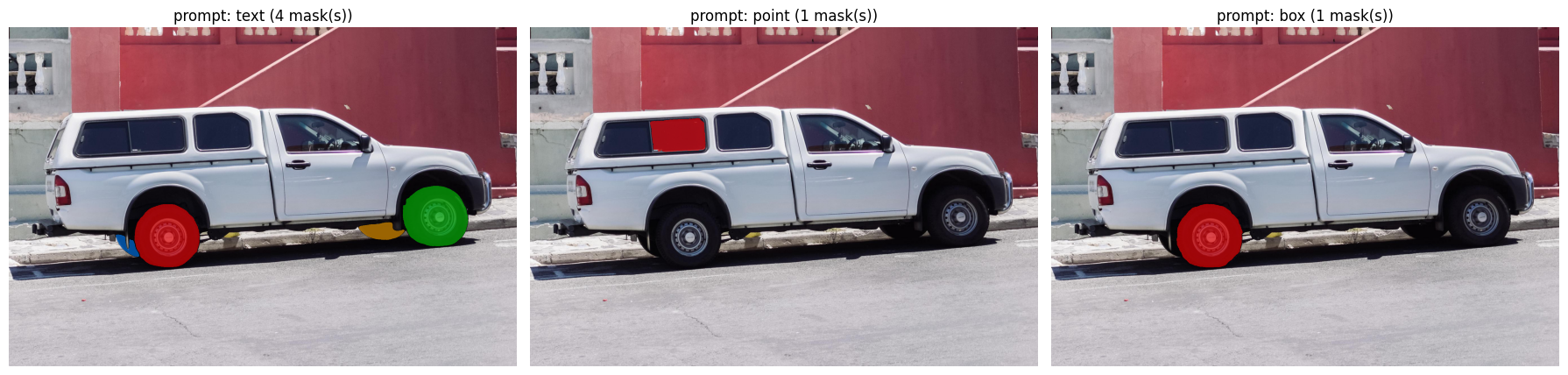
Run remote inference with text, point, and box prompts and visualize the masks
In this notebook we will focus on images only. However, SAM 3 also supports video.
Prerequisites
pip install datamint
pip install torch torchvision  # CUDA build recommended, see SAM 3's own install docs
pip install 'git+https://github.com/facebookresearch/sam3.git'
SAM 3’s checkpoints are gated on Hugging Face. Request access at huggingface.co/facebook/sam3, then authenticate locally (hf auth login) before running the cell that builds the model. A GPU is strongly recommended, as SAM 3 is an 848M-parameter model and the deploy step below requests one (with_gpu=True).
0. Setup
[ ]:
from datamint import Api

PROJECT_NAME = 'SAM3_Prompt_Tutorial'
MODEL_NAME = PROJECT_NAME

api = Api()
proj = api.projects.create(
    name=PROJECT_NAME,
    description='Tutorial: deploying SAM 3 for promptable segmentation',
    exists_ok=True,
)
1. Load SAM 3
[ ]:
import torch

DEVICE = 'cuda' if torch.cuda.is_available() else 'cpu'
if DEVICE != 'cuda':
    print('No CUDA device found - SAM 3 will run, but slowly. See the README for GPU setup.')
else:
    torch.backends.cuda.matmul.allow_tf32 = True
    torch.backends.cudnn.allow_tf32 = True
    torch.autocast('cuda', dtype=torch.bfloat16).__enter__()

from sam3 import build_sam3_image_model
from sam3.model.sam3_image_processor import Sam3Processor

sam3_model = build_sam3_image_model(device=DEVICE, enable_inst_interactivity=True)


def _unscript_sam2_transforms(model: torch.nn.Module) -> None:
    from sam3.model.utils.sam1_utils import SAM2Transforms
    from torchvision.transforms import Normalize, Resize

    for module in model.modules():
        if isinstance(module, SAM2Transforms):
            module.transforms = torch.nn.Sequential(
                Resize((module.resolution, module.resolution)),
                Normalize(module.mean, module.std),
            )


_unscript_sam2_transforms(sam3_model)
print(f'SAM 3 loaded on {DEVICE}')
2. Wrap SAM 3 in a DatamintModel Adapter
[21]:
import contextlib
import numpy as np

from datamint.entities.annotations import ImageSegmentation
from datamint.mlflow.flavors.model import DatamintModel, ModelSettings
from datamint.mlflow.flavors.prediction_router import DeployedModelPrompts
from datamint.mlflow.flavors.task_type import TaskType


class Sam3Adapter(DatamintModel):
    """Wraps SAM 3 for Datamint promptable-segmentation inference."""

    task_type = TaskType.IMAGE_SEGMENTATION

    def __init__(self, sam3_model, device: str = 'cpu') -> None:
        super().__init__(torch_model=sam3_model, settings=ModelSettings(need_gpu=True))
        self.device = device

    def predict_image(
        self,
        model_input: list,  # list[Resource]
        prompts: DeployedModelPrompts | None = None,
        **kwargs,
    ) -> list[list[ImageSegmentation]]:
        if prompts is None or not (prompts.text or prompts.point_coordinates or prompts.boxes):
            raise ValueError(
                'SAM 3 is a promptable model. Pass `prompts` with at least one of '
                'text, points, or boxes.'
            )

        autocast_ctx = (
            torch.autocast('cuda', dtype=torch.bfloat16)
            if self.device == 'cuda' else contextlib.nullcontext()
        )

        with autocast_ctx:
            model = self.get_pytorch_model()
            processor = Sam3Processor(model, device=self.device)
            results = []

            for resource in model_input:
                image = resource.fetch_file_data(auto_convert=True, use_cache=True)
                state = processor.set_image(image)
                annotations = []

                # --- Text prompt
                if prompts.text:
                    phrase = prompts.text
                    state = processor.set_text_prompt(prompt=phrase, state=state)
                    masks = state['masks'].squeeze(1).cpu().numpy()  # (N, H, W) bool
                    for i, mask in enumerate(masks):
                        annotations.append(
                            ImageSegmentation(name=f'{phrase}_{i}', segmentation_data=mask.astype(np.uint8))
                        )

                # --- Point / box prompts
                if prompts.point_coordinates or prompts.boxes:
                    point_coords = np.array(prompts.point_coordinates) if prompts.point_coordinates else None
                    point_labels = np.array(prompts.point_labels) if prompts.point_labels else None
                    box = np.array(prompts.boxes[0]) if prompts.boxes else None

                    masks, scores, _ = model.predict_inst(
                        state,
                        point_coords=point_coords,
                        point_labels=point_labels,
                        box=box,
                        multimask_output=box is None,
                    )
                    best = masks[int(np.argmax(scores))]
                    annotations.append(ImageSegmentation(name='object', segmentation_data=best.astype(np.uint8)))

                results.append(annotations)

            return results


adapter = Sam3Adapter(sam3_model, device=DEVICE)
print('Adapter ready.')
Adapter ready.
2.1 Smoke-test the adapter locally
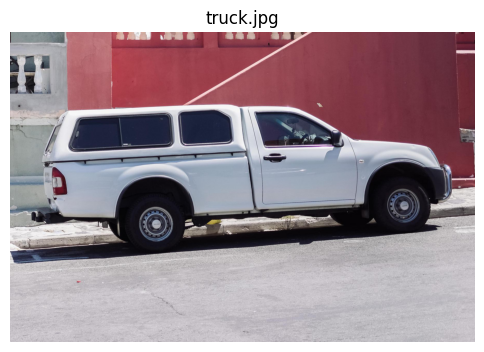
We use truck.jpg, the image SAM 3’s own examples use for point/box prompting (sam3/assets/images/truck.jpg).
[22]:
import requests

from datamint.entities.resource import LocalResource

TRUCK_IMAGE_URL = 'https://raw.githubusercontent.com/facebookresearch/sam3/main/assets/images/truck.jpg'

truck_bytes = requests.get(TRUCK_IMAGE_URL, timeout=30).content
truck_resource = LocalResource(raw_data=truck_bytes, filename='truck.jpg')
[23]:
import io

from matplotlib import pyplot as plt
from PIL import Image

plt.figure(figsize=(6, 6))
plt.imshow(Image.open(io.BytesIO(truck_bytes)))
plt.axis('off')
plt.title('truck.jpg')
plt.show()
[24]:
prompt_sets = {
    'text': {'text': {'text': 'wheel'}},
    'point': {'point': {'coordinates': [[500, 375]], 'labels': [1]}},
    'box': {'box': {'boxes': [[425, 600, 700, 875]]}},
}

local_preds = {}
for label, prompts in prompt_sets.items():
    preds = adapter.predict([truck_resource], params={'prompts': prompts})
    local_preds[label] = preds[0]
    print(f'{label:>6}: {len(preds[0])} mask(s) - {[a.name for a in preds[0]]}')
INFO:datamint.mlflow.flavors.prediction_router:Registering handler for 'slice' mode via delegation to 'image' handler
INFO:datamint.mlflow.flavors.prediction_router:Registering bridge handler for 'volume' mode (prereq: 'slice')
INFO:datamint.mlflow.flavors.prediction_router:Registering bridge handler for 'frame' mode (prereq: 'image')
INFO:datamint.mlflow.flavors.prediction_router:Registering bridge handler for 'all_frames' mode (prereq: 'image')
INFO:datamint.mlflow.flavors.prediction_router:Received prediction request with 1 resources and params {'prompts': DeployedModelPrompts(text='wheel', point_coordinates=None, point_labels=None, boxes=None)} with mode 'image'
INFO:datamint.mlflow.flavors.prediction_router:Routing to 'image' mode for 1 resources
INFO:datamint.mlflow.flavors.prediction_router:Received prediction request with 1 resources and params {'prompts': DeployedModelPrompts(text=None, point_coordinates=[[500.0, 375.0]], point_labels=[1], boxes=None)} with mode 'image'
INFO:datamint.mlflow.flavors.prediction_router:Routing to 'image' mode for 1 resources
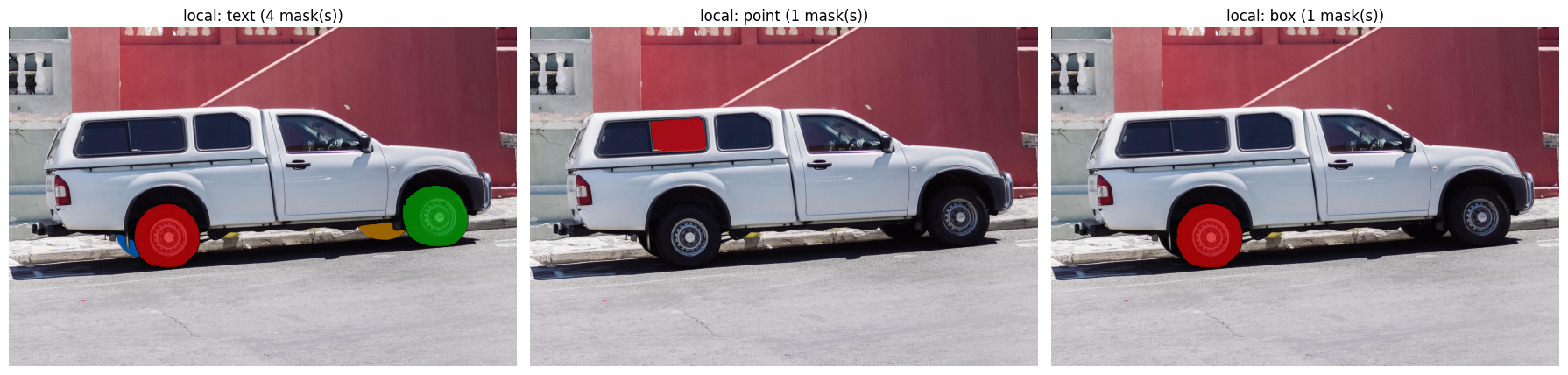
text: 4 mask(s) - ['wheel_0', 'wheel_1', 'wheel_2', 'wheel_3']
INFO:datamint.mlflow.flavors.prediction_router:Received prediction request with 1 resources and params {'prompts': DeployedModelPrompts(text=None, point_coordinates=None, point_labels=None, boxes=[[425.0, 600.0, 700.0, 875.0]])} with mode 'image'
INFO:datamint.mlflow.flavors.prediction_router:Routing to 'image' mode for 1 resources
 point: 1 mask(s) - ['object']
   box: 1 mask(s) - ['object']
[25]:
import io

import numpy as np
from matplotlib import pyplot as plt
from PIL import Image

image_array = np.array(Image.open(io.BytesIO(truck_bytes)).convert('RGB'))

COLORS = [(255, 0, 0), (0, 200, 0), (0, 128, 255), (255, 165, 0)]


def mask_overlay(mask: np.ndarray, color: tuple, alpha: float = 0.6) -> np.ndarray:
    mask = np.asarray(mask, dtype=bool)
    overlay = np.zeros((*mask.shape, 4), dtype=np.uint8)
    overlay[mask] = (*color, int(alpha * 255))
    return overlay


fig, axes = plt.subplots(1, len(local_preds), figsize=(6 * len(local_preds), 6))
for ax, (label, annotations) in zip(axes, local_preds.items()):
    ax.imshow(image_array)
    for i, ann in enumerate(annotations):
        ax.imshow(mask_overlay(ann.mask, COLORS[i % len(COLORS)]))
    ax.set_title(f'local: {label} ({len(annotations)} mask(s))')
    ax.axis('off')

plt.tight_layout()
plt.show()
3. Log and Register the Model in MLflow
[8]:
import tarfile
import tempfile
from pathlib import Path

import requests

SAM3_REF = 'main'
SAM3_TARBALL_URL = f'https://github.com/facebookresearch/sam3/archive/{SAM3_REF}.tar.gz'

sam3_src_dir = Path(tempfile.mkdtemp(prefix='sam3_src_'))
tarball_path = sam3_src_dir / 'sam3.tar.gz'
tarball_path.write_bytes(requests.get(SAM3_TARBALL_URL, timeout=60).content)

with tarfile.open(tarball_path) as tar:
    tar.extractall(sam3_src_dir)

SAM3_PACKAGE_DIR = sam3_src_dir / f'sam3-{SAM3_REF}' / 'sam3'
assert (SAM3_PACKAGE_DIR / '__init__.py').exists(), 'sam3 package not found where expected'
print(f'sam3 source ready for code_paths: {SAM3_PACKAGE_DIR}')
sam3 source ready for code_paths: /tmp/sam3_src_9lb8msgx/sam3-main/sam3
[9]:
import mlflow

import datamint.mlflow as datamint_mlflow
from datamint.mlflow.flavors import log_model

datamint_mlflow.set_project(PROJECT_NAME)
mlflow.set_experiment(PROJECT_NAME)

SAM3_RUNTIME_DEPS = [
    'timm>=1.0.17',
    'tqdm',
    'ftfy==6.1.1',
    'regex',
    'iopath>=0.1.10',
    'typing_extensions',
    'huggingface_hub',
    'einops',
    'pycocotools',
    'psutil',
]

with mlflow.start_run(run_name='sam3_deploy') as run:
    model_info = log_model(
        adapter,
        task_type=TaskType.IMAGE_SEGMENTATION,
        name='sam3_model',
        model_name=MODEL_NAME,
        code_paths=[str(SAM3_PACKAGE_DIR)],
        extra_pip_requirements=SAM3_RUNTIME_DEPS,
        extra_params={'prompts': '{}'},
    )

print(f'Model URI : {model_info.model_uri}')
print(f'Run ID    : {run.info.run_id}')
INFO:datamint.api.client:Derived MLflow server URL 'https://mlflow.datamint.io:443' from API URL 'https://api.datamint.io'
INFO:datamint.mlflow.flavors.datamint_flavor:Building datamint wheel from /home/luan/Desktop/Datamint/Codes/datamint-python-api for deploy container...
INFO:datamint.mlflow.flavors.datamint_flavor:datamint wheel built at /tmp/datamint_wheel_mw0k6j8a/wheel/datamint-2.36.0-py3-none-any.whl; will be bundled with model
2026/09/16 14:51:43 WARNING mlflow.types.type_hints: Union type hint with multiple non-None types is inferred as AnyType, and MLflow doesn't validate the data against its element types.
2026/09/16 14:51:43 WARNING mlflow.types.type_hints: Union type hint with multiple non-None types is inferred as AnyType, and MLflow doesn't validate the data against its element types.
2026/09/16 14:51:43 INFO mlflow.models.signature: Failed to infer output type hint, setting output schema to AnyType. Invalid type hint `dict`, it must include a valid element type. Type hints must be a list[...] where collection element type is one of these types: [<class 'int'>, <class 'str'>, <class 'bool'>, <class 'float'>, <class 'bytes'>, <class 'datetime.datetime'>], pydantic BaseModel subclasses, lists and dictionaries of primitive types, or typing.Any. Check https://mlflow.org/docs/latest/model/python_model.html#supported-type-hints for more details.
2026/09/16 14:51:43 INFO mlflow.models.signature: Running the predict function to generate output based on input example
INFO:datamint.mlflow.flavors.model:Loading model context context.artifacts={'datamint_wheel': '/tmp/datamint_wheel_mw0k6j8a/wheel/datamint-2.36.0-py3-none-any.whl', 'pytorch_model': '/tmp/tmpj20dx_7g'} | context.model_config={'device': 'cuda', 'datamint_version': '2.27.0', 'supported_modes': ['image', 'frame', 'all_frames', 'slice', 'volume'], 'model_settings': {'need_gpu': True}, 'linked_models': {}, 'task_type': 'image_segmentation', 'annotation_specs': None} and detecting device...
INFO:datamint.mlflow.flavors.model:Model config device: cuda
INFO:datamint.mlflow.flavors.model:Set inference device: cuda
2026/09/16 14:51:44 WARNING mlflow.models.signature: Failed to run the predict function on input example. To see the full traceback, set logging level to DEBUG.
2026/09/16 14:51:55 WARNING mlflow.utils.environment: Encountered an unexpected error while inferring pip requirements (model URI: /tmp/tmp9e014nme/model, flavor: python_function). Fall back to return ['cloudpickle==3.1.2']. Set logging level to DEBUG to see the full traceback.
INFO:datamint.mlflow.flavors.model:Loading model context context.artifacts={'datamint_wheel': '/tmp/tmp9e014nme/model/artifacts/datamint-2.36.0-py3-none-any.whl', 'pytorch_model': '/tmp/tmp9e014nme/model/artifacts/tmpj20dx_7g'} | context.model_config={'annotation_specs': None, 'datamint_version': '2.27.0', 'device': 'cuda', 'linked_models': {}, 'model_settings': {'need_gpu': True}, 'supported_modes': ['image', 'frame', 'all_frames', 'slice', 'volume'], 'task_type': 'image_segmentation'} and detecting device...
INFO:datamint.mlflow.flavors.model:Model config device: cuda
INFO:datamint.mlflow.flavors.model:Set inference device: cuda
2026/09/16 14:51:55 WARNING mlflow.models.model: Failed to validate serving input example {
  "inputs": [
    {
      "id": "model_id",
    .... Alternatively, you can avoid passing input example and pass model signature instead when logging the model. To ensure the input example is valid prior to serving, please try calling `mlflow.models.validate_serving_input` on the model uri and serving input example. A serving input example can be generated from model input example using `mlflow.models.convert_input_example_to_serving_input` function.
Got error: CUDA out of memory. Tried to allocate 12.00 MiB. GPU 0 has a total capacity of 5.67 GiB of which 47.62 MiB is free. Including non-PyTorch memory, this process has 4.65 GiB memory in use. Of the allocated memory 4.40 GiB is allocated by PyTorch, and 148.94 MiB is reserved by PyTorch but unallocated. If reserved but unallocated memory is large try setting PYTORCH_CUDA_ALLOC_CONF=expandable_segments:True to avoid fragmentation.  See documentation for Memory Management  (https://docs.pytorch.org/docs/stable/notes/cuda.html#optimizing-memory-usage-with-pytorch-cuda-alloc-conf)
Registered model 'SAM3_Prompt_Tutorial' already exists. Creating a new version of this model...
2026/09/16 14:58:33 INFO mlflow.store.model_registry.abstract_store: Waiting up to 300 seconds for model version to finish creation. Model name: SAM3_Prompt_Tutorial, version 6
Created version '6' of model 'SAM3_Prompt_Tutorial'.
🏃 View run sam3_deploy at: https://mlflow.datamint.io:443/#/experiments/35/runs/1d529c5ab5674fe3974e78a147284b0c
🧪 View experiment at: https://mlflow.datamint.io:443/#/experiments/35
Model URI : models:/m-6912ecf5fe924f80baf9c2a66ce0bd85
Run ID    : 1d529c5ab5674fe3974e78a147284b0c
3.1 Assign the latest alias
[ ]:
from mlflow import MlflowClient

MODEL_ALIAS = 'version-one'
client = MlflowClient()

versions = client.search_model_versions(f"name='{MODEL_NAME}'")
latest_version = max(versions, key=lambda v: int(v.version))

client.set_registered_model_alias(MODEL_NAME, MODEL_ALIAS, latest_version.version)
print(f"Alias '{MODEL_ALIAS}' -> version {latest_version.version}")
4. Deploy to the Datamint Server
[ ]:
job = api.deploy.start(
    model_name=MODEL_NAME,
    model_alias=MODEL_ALIAS,
    with_gpu=True,
)

print('Deployment job started')
print(f'Job ID : {job.id}')
[ ]:
job.wait(on_status=lambda j: print(f'Status: {j.status}'))

if job.status == 'completed':
    print('Deployment successful!')
else:
    print(f'Deployment failed: {job.error_message}')
    print(job.build_logs)
5. Remote Inference with Prompts
[ ]:
import io

truck_buf = io.BytesIO(truck_bytes)
truck_buf.name = 'truck.jpg'

r = api.resources.upload_resource(
    truck_buf,
    mimetype='image/jpeg',
    tags=['sam3-demo'],
    publish_to=proj,
)
INFO:user_logger:"truck.jpg" uploaded
INFO:user_logger:Adding resources to project
[7]:
from datamint.api.dto import BoxPrompt, InferencePrompts, PointPrompt

r = api.resources.get_list(project_name=PROJECT_NAME, limit=1)[0]
MODEL_ALIAS = 'version-one'

print(r)

jobs = {
    'text': api.inference.predict_image(
        MODEL_NAME, model_alias=MODEL_ALIAS, resource_id=r.id,
        prompts=InferencePrompts(text='wheel'),
    ),
    'point': api.inference.predict_image(
        MODEL_NAME, model_alias=MODEL_ALIAS, resource_id=r.id,
        prompts=InferencePrompts(points=[PointPrompt(label=1, x=500, y=375)]),
    ),
    'box': api.inference.predict_image(
        MODEL_NAME, model_alias=MODEL_ALIAS, resource_id=r.id,
        prompts=InferencePrompts(boxes=[BoxPrompt(x_min=425, y_min=600, x_max=700, y_max=875)]),
    ),
}

for label, job in jobs.items():
    job.wait()
    preds = job.predictions[0]
    print(f'{label:>6}: {len(preds)} masks(s)')
    for ann in preds:
        print(ann)
ImageResource(id='84b473cf-7267-435a-9d33-a22ed038e5d6', filename='truck.jpg', size=0.3MB)
  text: 4 masks(s)
ImageSegmentation
  Name: wheel_0
  Scope: image
  Annotation Type: segmentation
ImageSegmentation
  Name: wheel_1
  Scope: image
  Annotation Type: segmentation
ImageSegmentation
  Name: wheel_2
  Scope: image
  Annotation Type: segmentation
ImageSegmentation
  Name: wheel_3
  Scope: image
  Annotation Type: segmentation
 point: 1 masks(s)
ImageSegmentation
  Name: object
  Scope: image
  Annotation Type: segmentation
   box: 1 masks(s)
ImageSegmentation
  Name: object
  Scope: image
  Annotation Type: segmentation
[26]:
fig, axes = plt.subplots(1, len(jobs), figsize=(6 * len(jobs), 6))
axes = np.atleast_1d(axes)

for ax, (label, job) in zip(axes, jobs.items()):
    ax.imshow(image_array)
    for i, ann in enumerate(job.predictions[0]):
        ax.imshow(mask_overlay(ann.mask, COLORS[i % len(COLORS)]))
    ax.set_title(f'prompt: {label} ({len(job.predictions[0])} mask(s))')
    ax.axis('off')

plt.tight_layout()
plt.show()