Quick Start
Beginner
This guide will help you set up and start using the Datamint Python API for your medical imaging projects.
Installation
Datamint requires Python 3.10+ and a Datamint account with an API key.
pip install -U datamint
We recommend a dedicated virtualenv to avoid conflicting with your system packages:
python3 -m venv datamint-env
source datamint-env/bin/activate  # Windows: datamint-env\Scripts\activate.bat
pip install -U datamint
Verify your installation
python -c "import datamint; print(datamint.__version__)"
Setup API Key
Obtaining an API key
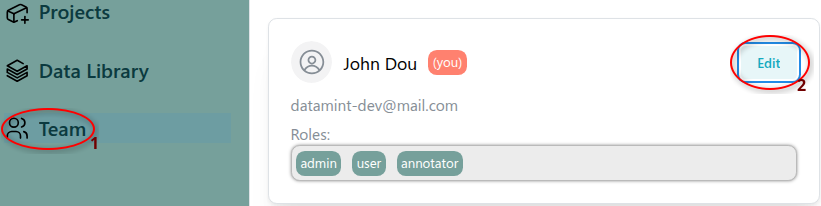
Before using the Datamint API, you need to configure your API key. If you have the necessary permissions, you can obtain one from the Datamint platform:
In the left sidebar, select Teams.
Click Edit on your user profile.
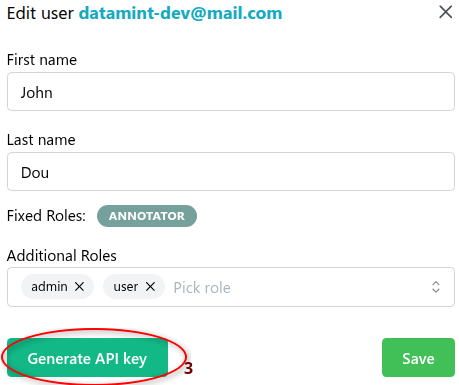
Click Generate API key to create a new API key.
Note
If you don’t have the necessary permissions, ask your administrator.
Configuring your API key
Once you have your API key, choose one of the following options:
Option 1: Using the CLI tool (recommended)
datamint config --api-key YOUR_API_KEY
Option 2: Setting an environment variable
export DATAMINT_API_KEY="your_api_key"
Option 3: Programmatically in Python
from datamint import Api

api = Api(api_key="your_api_key")
Scaffold your first project
datamint init generates a ready-to-run set of numbered scripts tailored to your task
(detection, segmentation, or classification):
datamint init
It asks for a project name and task type, then writes six scripts into a new directory (upload data, explore, build a dataset, train, evaluate, and deploy), so you can follow them in order without writing boilerplate.
Don’t have your own data yet? datamint init can populate the project with a small
public example dataset instead — see Command-line tools for details, or run
datamint example --help directly.
Logging to a file
Every datamint command (and the SDK itself, when imported in your own scripts)
writes an INFO-level log to a file under ./.log/ in the current working
directory, one file per run, named datamint_<timestamp>_<pid>.log. This is meant
as a support/debug artifact you can attach when reporting an issue, it captures
warnings, errors, and full tracebacks regardless of how verbose the console output is.
This is on by default. To turn it off, set the DATAMINT_LOG_FILE environment
variable to 0, false, or no:
Your first API call
Once installed and configured, verify everything works end-to-end:
from datamint import Api

api = Api()
for project in api.projects.get_all():
    print(project.name)
Tip
Want to see full end-to-end examples? Browse our tutorial notebooks — they cover real datasets, training workflows, and deployment from scratch.
Next Steps
Master the command-line interface: Command-line tools
Check out our Python API documentation: Client Python API
Our PyTorch, Lightning and MLflow integration: PyTorch & Lightning Integration
Use the built-in trainers and custom model integration patterns: Training your Model
Troubleshooting
ImportError: No module named ‘datamint’
Make sure you activated your virtual environment before running your script:
source datamint-env/bin/activate  # Linux/macOS
datamint-env\Scripts\activate     # Windows
Or install globally (not recommended):
pip install --user -U datamint
API authentication errors
Verify your API key is set correctly:
datamint config