Setup API key
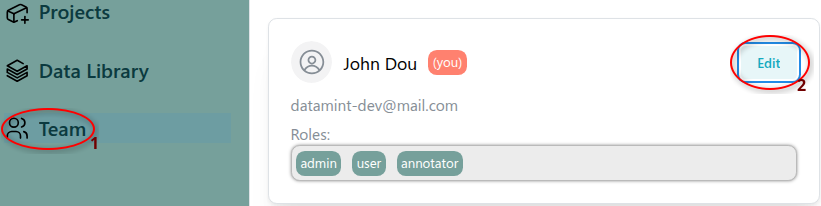
To use the Datamint API, you need to set up your API key. If you have the necessary permissions, you can obtain one from the UI:
In the left sidebar, select Teams.
Click Edit on your user profile.
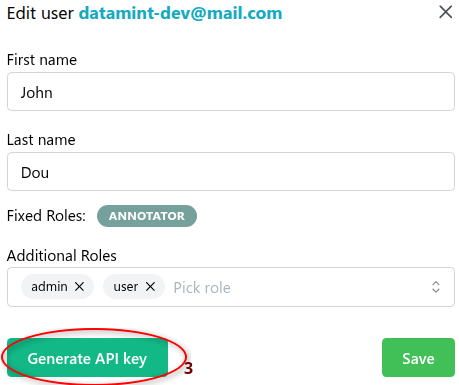
Click Generate API key to create a new API key.
Note
If you don’t have the necessary permissions, ask your administrator.
Once you have your API key, use one of the following methods to configure it:
Method 1: Command-line tool (recommended)
Run datamint-config in the terminal and follow the instructions. See Command-line tools for more details.
Method 2: Environment variable
Specify the API key as an environment variable.
export DATAMINT_API_KEY="my_api_key"
# run your commands (e.g., `datamint-upload`, `python script.py`)
import os
os.environ["DATAMINT_API_KEY"] = "my_api_key"
Method 3: Api constructor
Specify API key in the Api constructor:
from datamint import Api

api = Api(api_key='my_api_key')